Twitch Creator Badge Drops let streamers create custom permanent chat badges that viewers earn through events. Drives up to 50 percent more gift sub revenue and turns fans into loyal collectors. Full setup design tips pros cons and best practices inside.
Creator Badge Drops
Twitch released a new monetization tool on May 19 2026 that has attracted attention among streamers. Creator Badge Drops lets monetized creators design and deploy limited time custom chat badges. Viewers earn these badges by actively participating during scheduled events, whether that means subscribing, gifting subs, or simply watching for a set amount of time.
Unlike traditional subscriber badges that unlock through tenure, these are event specific collectibles. Once earned during the window, they live permanently in a viewer’s collection for your channel only. This creates a lasting status symbol that shows everyone they were there.
According to Twitch, some early creators testing the feature saw gift sub revenue increases of up to 50 percent during launch events.
If you are a streamer looking to support milestones, subathons, anniversaries, or game launches, this could become a valuable engagement tool for community-focused streams.
Quick Answer
Twitch Creator Badge Drops are limited-time community events that let Affiliates and Partners reward viewers with permanent collectible chat badges for subscribing, gifting subs, or watching streams during special events.
- Launch date: May 19, 2026
- Available to: Monetized Affiliates and Partners
- Reward types: Subscription badge + optional watch-time badge
- Maximum event length: 28 days
- Badge format: Static PNG under 25 KB
What Exactly Are Creator Badge Drops?
Creator Badge Drops are time limited events where you create up to two custom channel specific badges.
- Mandatory Sub or Gift Reward Badge: Viewers earn it by purchasing or gifting 1 to 5 subscriptions. You choose the exact number during the event.
- Optional Watch Time Reward Badge: Once the sub badge is set, you can add a second badge unlocked after viewers watch your stream for a specific number of minutes you define.
Badges are static non animated PNGs, square, max 25 KB, and must follow Twitch’s badge guidelines. Once a viewer qualifies, the badge is awarded automatically and stays in their collection forever, visible only in your channel’s chat.
These are not global badges or drops tied to games. They are hyper personalized to your community.
Example of how the event callout appears in chat. It shows as a clear prominent green box tied directly to the sub modal.
How to Set Up a Creator Badge Drop Event (Step by Step)
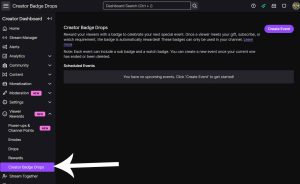
Access is built right into the Creator Dashboard. No extra approvals are needed for eligible monetized Affiliates and Partners.
- 1. Go to Viewer Rewards then Badge Rewards
- 2. Click Create Event
- 3. Configure the Rewards
- 4. Schedule It
- 5. Launch
Pro Tip: Test your PNGs at 72 by 72, 36 by 36, and 18 by 18 sizes. Twitch auto resizes them. Use high contrast designs that pop even when tiny.
Important Limitations to Know
- Event settings cannot be edited after launch.
- Ending an event early can cancel unfinished viewer progress.
- Only static badges are currently supported.
- Badge visibility is limited to your channel’s chat.
- Twitch may expand or modify feature availability over time.
Badge Design Mastery: Make Them Want to Collect
Twitch’s specs are strict for a reason. Badges must render cleanly in chat.
- Format: PNG only square non animated
- Size: Max 25 KB total
- Recommended resolution: At least 120 by 120 pixels
- Name: Up to 25 characters (for example 28DaySubathon or Founders2026)
- Compliance: Follow Twitch Badge Guidelines or risk rejection and possible account flags
- Creative advice beyond the rules
The Viewer Side: How They Earn Track and Show Off Badges
Viewers see a Community Callout banner over chat announcing the event and exact requirements. They also get prompts in the sub or gift modal.
Progress tracking is seamless.
- Real time Drops Tracker right in your channels chat.
- Full details on the Drops Inventory page at Twitch.tv/drops.
- Badge appears automatically in their collection for your channel only.
Once earned, viewers manually select it from their badge card by clicking any username in your chat. It displays alongside their sub badge or other flairs. No extra perks. Purely cosmetic prestige.
How Creator Badge Drops Compare to Other Twitch Rewards
| Feature | Creator Badge Drops | Subscriber Badges | Hype Trains | Power Ups (Bits) |
|---|---|---|---|---|
| Trigger | Scheduled event (subs or watch time) | Ongoing sub tenure | Spontaneous spending spikes | Instant Bits redemption |
| Duration | Time limited event (max 28 days) | Permanent (evolves) | Short burst | Temporary effect |
| Reward Type | Permanent custom badge | Tiered tenure badges | Temporary hype plus emotes | On screen or sound effects |
| Customization | Fully custom PNG by creator | Limited to Twitch templates | None | Creator can now customize |
| Goal | Event participation and loyalty | Long term sub support | Community momentum | Fun immediate interaction |
Badge Drops sit in a sweet spot. They offer scheduled individual progress and permanent flex.
Why This Feature Could Be So Effective Psychologically
Creator Badge Drops tap into several proven community engagement mechanics already common in gaming and live-service platforms:
- Scarcity: Limited-time rewards create urgency.
- Status signaling: Rare chat badges act as social proof inside communities.
- Collection behavior: Many viewers enjoy earning exclusive digital collectibles.
- Event participation: Timed rewards encourage viewers to show up live instead of watching later.
This makes Creator Badge Drops feel closer to seasonal in-game cosmetics or event-exclusive rewards than traditional Twitch subscriptions.
One interesting long-term question is whether Creator Badge Drops eventually evolve into a secondary collectible ecosystem on Twitch, where longtime viewers build recognizable event histories across years of streams.
Pros and Cons (Real Talk)
- Pros
- Cons
Best Practices: How Top Streamers Will Use This
- Announce early
- Theme it
- Stack features
- Track and iterate
- Start small
- Community loop
Best Use Cases for Creator Badge Drops
- Subathons
- Channel anniversaries
- Game launch streams
- Charity events
- Partner celebrations
- Seasonal community events
- Milestone streams
- Special guest collaborations
What the Community Is Saying Right Now (May 19 2026)
The launch is fresh but reactions are already positive.
- Twitch Partner LateNightCandi said The creator badge drops is such a fun idea.
- Streamer and tech analyst Zach Bussey broke down the dashboard and called it a major addition for monetized creators.
- Official Twitch Support is pushing it hard with clear visuals and setup links.
Early sentiment shows excitement mixed with finally something that rewards showing up.
Comprehensive FAQ: Every Question Streamers and Viewers Are Asking
- What are the exact image requirements?
- Can I run multiple events at once?
- What is the minimum watch time?
- Can viewers track progress easily?
- What happens if I end the event early?
- Do gift subs count toward the buyers progress?
- Are these badges visible on mobile?
- Do badges give any gameplay or VIP perks?
- Eligibility?
- Analytics?
One of Twitch’s Most Interesting New Community Monetization Tools
Creator Badge Drops are a practical way to reward participation during your biggest moments. They turn passive viewers into active participants and gift sub buyers while giving your most loyal fans something permanent to flex.
Whether you are a small Affiliate running your first subathon or a Partner celebrating 5 years, this feature levels the playing field. Your creativity now drives revenue and retention.
Head to your Badge Rewards dashboard right now and start planning your first event. Many creators will likely use these events to experiment with higher engagement and gifting activity.
What event are you launching first? Drop your ideas in the comments. The Twitch creator community is about to get a whole lot more collectible.
Sources: Official Twitch Blog and Twitch Help Center (plus Creator Dashboard screenshots and real time community reactions).
Quick Poll: Your Take
Will you launch your first Creator Badge Drop event this month?