
Stream Rewind: Changing How We Watch Twitch Live Streams
Twitch has rolled out Stream Rewind, a feature that lets viewers pause, rewind, and replay key moments during a live stream without losing chat engagement. Here’s how it works, who can use it, and why it matters for both streamers and fans.
Twitch Catches Up to the Competition
While YouTube has offered live rewind capabilities through its DVR feature for years, allowing viewers to pause, rewind, and fast-forward during broadcasts, newer platforms like Kick introduced their real-time rewind feature in January 2025. Now, Twitch is catching up with Stream Rewind, providing similar flexibility to its users and enhancing the overall live streaming experience on the platform.
What is Twitch Stream Rewind?
Stream Rewind allows eligible viewers to go back in time on a live broadcast. Using the timeline bar, you can rewind, pause, and resume without missing out on the live chat. This bridges the gap between live streaming and on-demand content.
Try dragging the circle to simulate rewinding.
Who Can Use Stream Rewind?
Streamers: Affiliates and Partners can enable Stream Rewind in their channel settings.
Viewers: Subscribers and Turbo users gain early access depending on the streamer’s VOD and ad preferences.
- Pause and resume effortlessly
- Rewind to relive key plays
- Stay connected with live chat
How to Enable Stream Rewind on Your Channel
If you’re an Affiliate or Partner, enabling Stream Rewind takes only a few steps inside your Twitch Creator Dashboard.
- Log into your Creator Dashboard
- Go to Settings → Stream
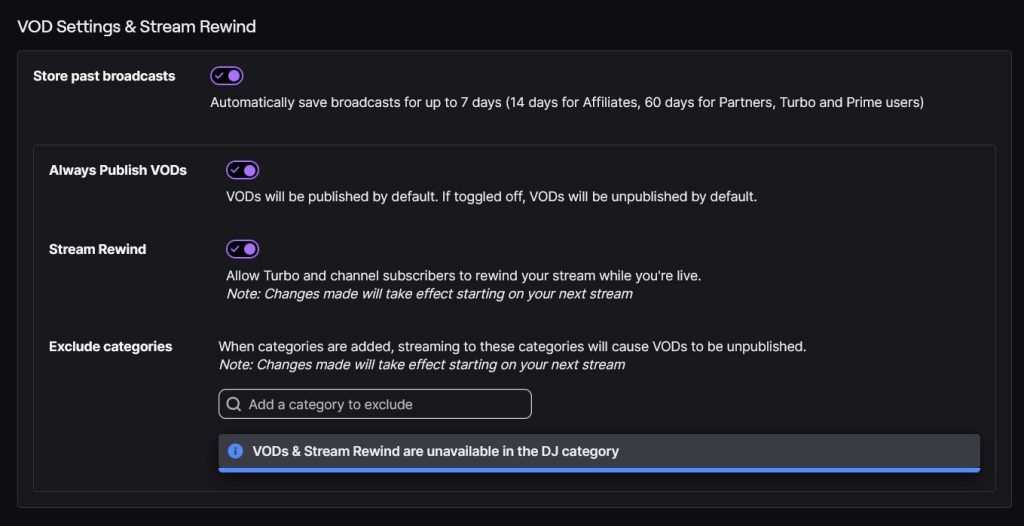
- Turn on Store Past Broadcasts and Always Publish VODs
- Toggle on Stream Rewind
Excluded Categories
When categories are added, streaming to these categories will cause VODs to be unpublished. Note: Changes made will take effect starting on your next stream.
For example, Stream Rewind is not available for the DJ category or for DJ Program streams because they do not allow for VODs to be published.
Stream Rewind FAQ
A pop-up notification alerts eligible viewers, and the timeline briefly appears.
Yes. Simply toggle it off in your VOD settings. Changes to Stream Rewind will take effect when you restart the stream or starting on your next stream.
Stream Rewind is being tested with subscribers to refine ad delivery before broader rollout.
No. Certain categories like DJ streams remain excluded due to VOD restrictions.
Your Opinion
Do you think Stream Rewind will improve your Twitch experience?
Quick Poll: Your Take
Will Stream Rewind enhance your Twitch experience?