Over the past week, my Twitch channel experienced an unexpected surge in unique visitors, sparking my curiosity about the underlying causes. After diving into the analytics, I discovered that the boost primarily came from “Other Recommendations,” rather than blog embeds or other external sources. This revelation highlights how Twitch’s algorithmic recommendations can act as a powerful “cheat code” for channel growth. In this article, we’ll break down the official Viewer Discovery definitions from Twitch, explore my personal experience, and discuss how these systems often favor larger creators while providing insights for everyone.
Decoding Twitch’s Viewer Discovery Analytics
Twitch’s Viewer Discovery page offers creators valuable insights into how viewers find their live channels. It categorizes sources into “Views from Twitch” (onsite discoveries like Browse or homepage recommendations) and “Views from Outside Twitch” (offsite sources like Twitter or YouTube). By selecting specific sources and using the date picker, you can analyze trends and identify what drives viewership spikes. For instance, a high number from an offsite source might indicate effective marketing on that platform.
- Engaged Viewers: Logged in viewers who watched five or more minutes of your broadcast during the selected period.
- New Engaged Viewers: First time engaged viewers who meet the five minute threshold; spikes here may indicate successful discovery strategies.
- Returning Engaged Viewers: Viewers who have previously engaged and return for more.
- Unique Viewers: The total unique people who viewed your streams, counted once regardless of multiple sessions.
My Channel’s Surprise Boost
In my case, the metrics showed a clear uptick in unique and engaged viewers, traced back to “Other Recommendations.” This category, as per Twitch’s official definitions, includes viewers who clicked on your live channel page from recommendation powered surfaces outside the main homepage, such as the “For You” left sidebar featuring “Followed Channels” and “Recommended Channels.” It was a game changer, demonstrating how subtle algorithmic pushes can drive traffic without obvious promotion.
However, this algorithmic boost completely stopped around 9/20 when my stream went offline or was restarted. It seems like there might be a connection or some feedback mechanism that enables or disables this algo boost type, but we do not know for sure. This is all speculation and observation, and we could be wrong.
Analyzing My Viewer Stats
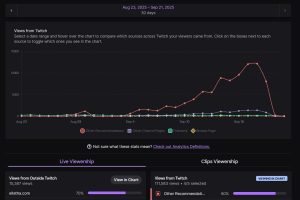
The following screenshot from my Twitch analytics dashboard illustrates the surge over the 30-day period from August 23 to September 21, 2025. The red line representing “Other Recommendations” shows a significant spike starting around September 4, peaking at over 10,000 views per day by mid-September before tapering off. In contrast, other onsite sources like Followers (green), Other Channel Pages (purple), and Browse Page (yellow) remained relatively low and stable. Overall, views from Twitch totaled 111,583, with “Other Recommendations” accounting for about 80% of the selected sources. External views were much lower at 15,387, primarily from ellatha.com (70%). This data underscores the dominant role of Twitch’s internal recommendations in driving the boost.
Simulate Your Traffic Sources
Twitch breaks down sources like Browse Page, Searches, Homepage Recommendations, and Other Recommendations. Use this interactive pie chart simulator to model potential distributions. Adjust sliders for major categories (they normalize to 100%) to see the visualization update in real time. Base your inputs on your own analytics for personalized insights.
Detailed Breakdown of Discovery Sources
Here’s a rundown of key onsite sources based on Twitch’s guidelines:
- Featured Section Front Page: From the carousel at the top of the Twitch homepage.
- Followers: From the Following page.
- Other Channel Pages: Suggested streams on other streamers’ offline pages.
- Other: Uncategorized sources like incognito browsing or bookmarks.
- Other Recommendations: Recommendation surfaces not on the main homepage, e.g., “For You” sidebar.
- Homepage Carousel: Specifically from the homepage carousel.
- Browse Page: From category directories, with breakdowns for games like “Just Chatting.”
- Homepage Recommendations: Other homepage areas, with impression data.
- Searches: From the search bar, including channel or content queries.
- Notifications Email: From email alerts.
- Notifications Onsite: From browser pop ups, creator inbox, or mobile pushes.
Why the Algorithm Favors Big Creators
My observations, Twitch’s recommendation system creates a self reinforcing cycle for larger channels. Established creators often receive steady viewer influxes via categories like Other Recommendations and Homepage Recommendations, even if content varies in quality. This “cheat code” provides them with thousands of unique visitors consistently, allowing more creative freedom. Smaller channels can compete by optimizing for these sources, focusing on tags, collaborations, and consistent streaming to align with the algorithm’s emphasis on engagement and variety.
Twitch’s Algorithm in 2025: What We Know
As of 2025, Twitch continues to refine its discovery tools to promote diverse content and prevent echo chambers. High traffic from Other Recommendations signals strong algorithmic alignment, encouraging experimentation with scheduling and community interactions.
Quick Poll: Your Take
Have you experienced a viewer boost from Twitch's 'Other Recommendations'?
Actionable Tips to Unlock Your Own Boost
- Regularly review your Discovery analytics to track source trends.
- Optimize tags and categories to enhance visibility in Browse and Searches.
- Leverage collaborations for cross channel recommendations.
- Build consistency to increase returning engaged viewers.
- Promote offsite to boost “Views from Outside Twitch.”
In wrapping up, my recent channel boost via Other Recommendations underscores the power of Twitch’s algorithmic “cheat code.” While it benefits big creators, understanding these discovery mechanics empowers all streamers to grow their audience strategically.