Subscribe to twitch.tv/daopa — Get 3 Months of Discord Nitro
Limited-time official Twitch × Discord offer. Support the channel and claim Nitro — ONLY while DaOpa is LIVE.
Do not buy multiple subs expecting multiple codes — you will only get one.
Critical: The offer only triggers when DaOpa is LIVE (not reruns). You MUST see the Drops banner in chat before subscribing.
Regular Nitro (3 months)
Promo Window
⚠️ BEFORE YOU SUB: Confirm the Drop Is Active
You MUST see these two things, or the code will not trigger:
- “Twitch Drop reward active” banner in chat
- “Supported streamer” label on the Drops page
If you don’t see both → DO NOT SUBSCRIBE.
Try: Refresh stream • Switch to browser (mobile app often hides Drops) • Wait 30 seconds
Mobile Twitch app is buggy — if no banner, open twitch.tv/daopa in Chrome/Safari instead. Most “I didn’t get code” complaints come from mobile app users.
About the Offer
This official promotion runs from Nov 18, 2025 – Dec 2, 2025 (12:00 PM PT). New paid subscriptions (Tier 1–3), multi-month subs (3 or 6 months), and gifted subs are eligible — only while DaOpa is live.
Important eligibility rules:
- Prime subs and existing recurring renewals do not qualify.
- Discord users who had Nitro (or a trial) in the past 12 months are typically ineligible.
- One code per Twitch account during the promotion window.
- Codes must be redeemed by Jan 1, 2026 11:59 PM ET.
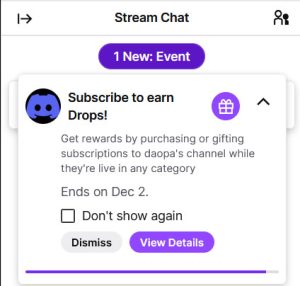
↑ Click image to enlarge ↑
Your Savings
How to Claim (Step-by-step)
- Confirm Drop is active (see section above)
- Subscribe to twitch.tv/daopa while live
- Open Twitch → Inventory → Drops & Rewards (or check notifications)
- Copy the Nitro code
- Redeem in Discord → User Settings → Gift Inventory
How Long Until I Get My Code?
Usually within 1–10 minutes after subscribing.
99% of the time it appears instantly or within 5 minutes.
If after 30 minutes nothing → contact Twitch Support (do not message me).
What Discord Nitro Gives You
- Animated avatars & custom profile
- 500 MB upload limit
- Use custom emojis globally
- Improved streaming & Go-Live quality
- Server boost perks
How to Cancel Nitro Auto-Renewal (Optional)
If you want to avoid charges after the free period, cancel auto-renewal. This will not remove access to the free months you earned.
- Open Discord (desktop or web).
- User Settings → Subscriptions.
- Find Nitro → Cancel.
Quick FAQ
Q: Will I get Nitro instantly?
A: Twitch issues a code in your Drops & Rewards inventory — redeem it on Discord.
This promotion is provided entirely by Twitch and Discord. I (DaOpa / this website) cannot issue codes, replace codes, extend deadlines, or help bypass eligibility rules. Availability, eligibility, region restrictions, and fulfillment are controlled solely by Twitch and Discord. Always review their official terms. No refunds or compensation if you are ineligible or miss the redemption window.