Unlocking the Mayhem: Your Guide to SHiFT Accounts in Borderlands 4
Hey Vault Hunters, with Borderlands 4 set to launch on September 12, 2025, it’s time to get your gear in order. One essential piece that’s flying under the radar for some folks is the SHiFT Account. It’s this free service baked right into Borderlands 4 and the rest of the series, handling everything from online play to snagging those sweet rewards. I’ve pulled together the key details from what we know so far, and trust me, you’ll want this set up before you dive into the chaos.
Why Bother with a SHiFT Account? The Perks That Pack a Punch
First off, if you’re planning to team up with pals across different platforms, SHiFT is your best friend. It powers cross-play multiplayer, so whether you’re on PC, console, or whatever, you can jump in together. The new lobby system’s all about that easy drop-in/drop-out vibe, making co-op smoother than ever.
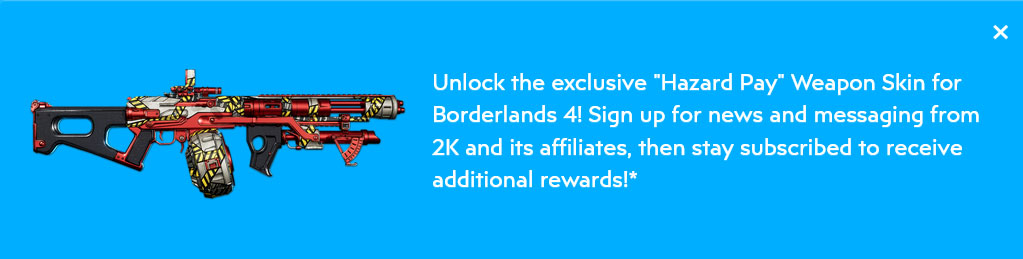
Then there’s the loot side of things. SHiFT lets you punch in those limited-time codes for in-game goodies like Golden Keys that unlock chests full of rare gear. Sign up for a free account, agree to the terms, and opt into the newsletters and marketing? You’ll score an exclusive “Hazard Pay” Weapon Skin when the game drops. And word is, the devs have more treats planned for subscribers down the line, so sticking around could pay off big time.
Getting Your SHiFT Together: Step-by-Step Setup
Creating one is straightforward and costs nothing. Just hop over to the Gearbox SHiFT website and sign up. After that, link it to your gaming platform, be it Steam, PlayStation, Xbox, or Nintendo.
When you’ve got a code to redeem, you can do it on the website or right in the game’s Social menu once Borderlands 4 launches. For stuff like that automatic weapon skin, make sure you’re logged in with your SHiFT Account from day one. Easy peasy, right?
The Fine Print: What You Need to Know
Again, it’s free. No strings there. But you’ll need a solid internet connection for online features, cross-play, and claiming rewards. Each code’s good for one redemption per account, so no farming the same one over and over. And if you’re on console, don’t forget you might need that platform’s online sub, like Nintendo Switch Online, for multiplayer.
SHiFT’s been a staple in the series, but with BL4’s upgrades, it’s looking more vital than before.
Interactive Fun: Build Your SHiFT Checklist
To make prepping more engaging, I’ve put together this interactive checklist. Tick off the steps as you go, and it’ll cheer you on with some animations. It’s a fun way to ensure you’re launch-ready. Give it a try!
Your SHiFT Setup Checklist
Progress: 0/4
There you have it, your crash course on SHiFT Accounts. If you’re hyped for Borderlands 4 like I am, drop a comment: What’s the first thing you’ll do with your new skin? Let’s chat!